Track your time
without the clutter.

Track tickets, not teams. Sinesco Time Tracker gives you a timer, reports you can argue with and exports your invoice can use, with no team features you have to switch off first.

Start a timer in one click Hosted in the EU, on our own hardware Installs as an app on your phone and desktop
Top cover

Built for Solo Professionals

Everything you need to track your time. Nothing you don't.

No teams

Designed for solo professionals. No team monitoring, no approvals, no unnecessary complexity.

Ticket-first workflow

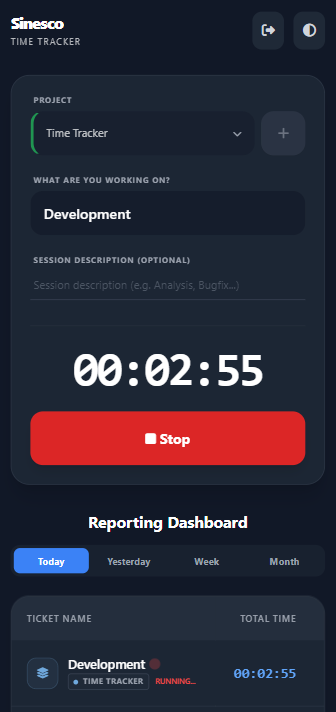
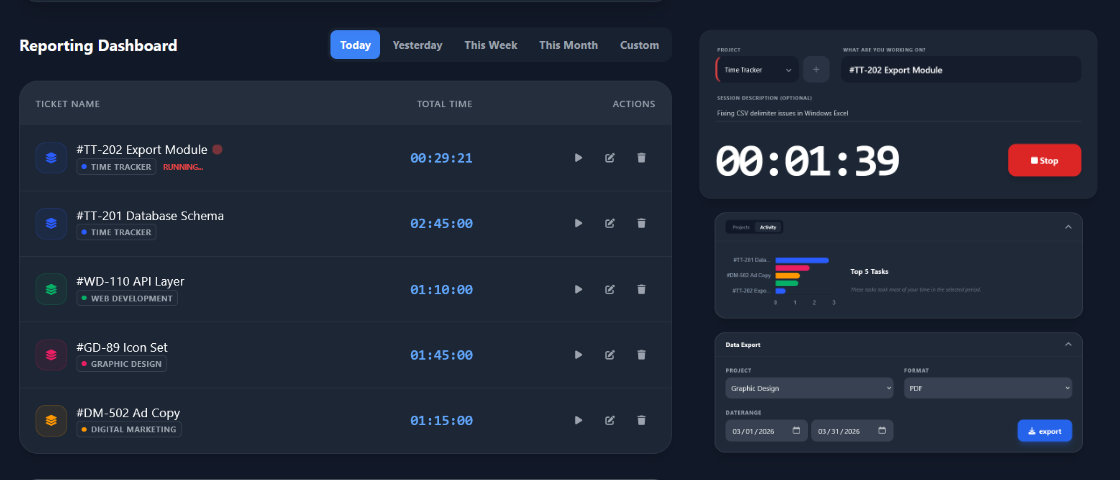
Start a timer on any project and ticket. Type a ticket name and your recent ones come up first. Starting a new timer stops the running one, so you always have one open session.

Easy export

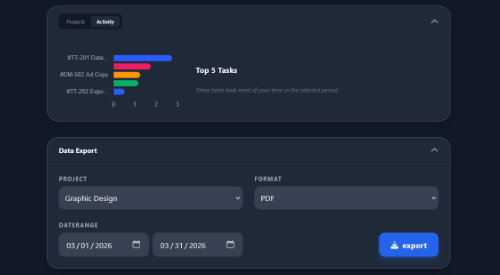
Filter by project and date range, then take invoice-ready data as PDF, CSV or JSON. The period summary, the detailed per-session list, or both.

Retroactive editing

Forgot to stop the timer? Set the start and end after the fact, add a session by hand, move an entry to another ticket, or move a whole ticket to another project.

Clear productivity insights

Totals and charts for today, yesterday, this week, this month or any range you set. Drill from a project into a ticket and into every session behind the number.

Zero friction

No complex onboarding, no nested menus. The fastest way to track time. Period.

Simple workflow for deep work

Designed to stay out of your way: precise, organized, effortless.

1
Step 1

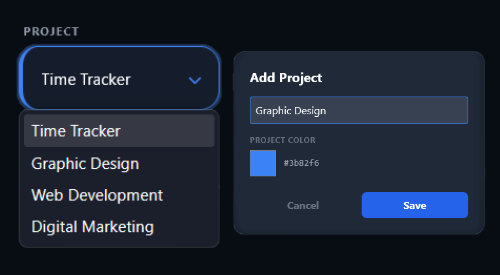
Select or create a project

Organize your work from the start. Choose an existing project or create a new one in seconds.

step-1
step-2
2
Step 2

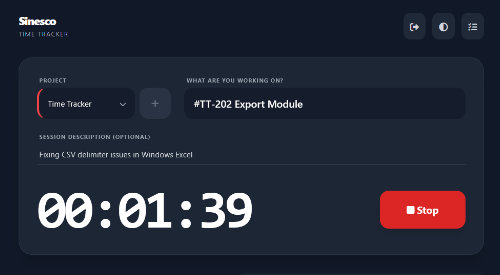
Enter ticket and details

Add your ticket name or ID. Include an optional note for extra context in your exports and reports.

3
Step 3

Server-side tracking

Start the timer and go to work. Everything runs on the server, so you can close the app or switch to another device. Your tracking is always synced.

Server-Side Timer Cross-Device Sync
App Closed 01:23:45 Cloud Server Active Session 01:23 Live Sync Any Device
step-4
4
Step 4

Refine and export

Fix anything you missed, then export the period as PDF, CSV or JSON for billing. Every export follows the project and date filters you picked.

Charts and date ranges PDF, CSV and JSON export

Stand-ups and status emails

Copy your week. Paste it anywhere.

Every report you open has a plain-text twin. One click copies the recap for that period to your clipboard, shaped like the message you were about to type by hand.

Work Recap

A recap that answers "What did you work on?"

Choose your period, hit copy, and the recap is on your clipboard: projects, tickets, durations. Paste it into an email, a stand-up note or a message to a client.

  • Projects with per-ticket totals underneath
  • Plain text that pastes cleanly into email and chat
  • Always matches the date range on your screen
This week · Work Recap Copied
Acme website redesign
  #181 hero section      2h 40m
  #182 mobile nav        1h 15m
Internal
  weekly review            45m

Total                    4h 40m
Opt-in

An AI read on your week, if you want one

Turn on AI analysis and pick weekly or monthly. You get a written summary of where your hours went and what broke your rhythm, by email and in the app. It runs on our own GPU hardware in the EU, so your entries never reach a third-party AI service.

  • A model running on our own hardware, never a third-party service
  • Weekly or monthly, with the scope you set
  • Sent to your email and kept in the app
AI
Your month in numbers
Analysis · delivered to your email
  • · Two thirds of Thursday went into one ticket
  • · Client work drifted from mornings to late evenings
  • · Admin grew 40% month over month, almost all of it in one project
PWA Support

Install it once, use it everywhere.

Install Sinesco Time Tracker like a native app on Mac, Windows, iPhone or Android. Get a dedicated icon and stay focused without browser tabs.

  • ⌘
    Dedicated desktop window
  • 📱
    Mobile home screen access
  • 🔄
    Real-time cloud sync
app

Trust

Your data stays in the building

One account gives you access to every Sinesco app, and they all run on servers we own, in the EU.

One Hub account

You sign in with your existing Sinesco Hub account. No second password, and your access follows your subscription.

EU hosting on our hardware

The app, your time entries and every AI analysis are hosted on our own servers in the EU. Nothing is handed to outside AI or analytics services.

Private down to the API

Every request is checked against the entry's owner, and endpoints are rate-limited. Nobody else can read your timesheets.

Your numbers, in your hands

Exports include the raw sessions and totals, so you can take them to your own accountant or spreadsheet whenever you like.

English or Czech

The whole interface is available in both languages, and summaries follow your browser's time zone.

Kind to late nights

Light or dark theme, remembered between visits. Installed as an app, it loads even without a connection.

One plan with everything in it

Everything you need, nothing you don't.

Early Access Offer

Choose your billing period

€ 8.99

/mo

+ VAT where applicable

  • Unlimited projects, tickets and sessions
  • PDF, CSV and JSON exports with filters
  • Charts, custom ranges and Work Recap copy-paste
  • One timer at a time, built for one person
  • Opt-in AI analysis on our own hardware
  • One account with every Sinesco app
Try 14 days for free

14-day free trial · No credit card required · Cancel anytime.

FAQ

Common questions

Freelancers, consultants and anyone else who works solo and bills by the hour. There are no teams, approvals or per-seat licences to wade through: just a timer, tickets, projects and reports.
No. Time Tracker uses your Sinesco Hub account, the same one you use for every other Sinesco app. Your subscription determines which apps you have access to, and changes apply immediately.
A running session follows you across devices: open the app on your phone and stop it there, or start a new one and the previous one stops automatically. If you forgot to track a session entirely, you can add it afterwards with its actual start and end time.
Give each client their own project, and the report totals show those hours grouped by ticket, so you know what to bill before you write the invoice. Open a ticket to see every session behind the number, including date, start and end time, description and duration. Reports cover today, yesterday, this week, this month or any custom range.
No, it's opt-in. Turn it on, choose a weekly or monthly frequency, and only your own entries within the scope you select are analysed. The model runs on our own hardware in the EU, and you can turn it off again at any time.
Export a PDF for a printable report, or CSV and JSON for spreadsheets and integrations, all filtered by project and date range. You can export the period summary, the detailed per-session list, or both.

Log your first session in a minute

Create an account, pick a project, start the timer. The trial gives you the whole app, not a slice of it.

No credit card required · Cancel anytime.